This summary is not available. Please click here to view the post.
Showing posts with label CD/DVD Softwares. Show all posts
Showing posts with label CD/DVD Softwares. Show all posts
Allok Video to DVD Burner 2.4.1106
Allok Video to DVD Burner is an easy and professional DVD maker software that lets you convert all favorite movies to DVD movies and burning
it onto DVD Disc, and then watch them on home DVD Player ,car DVD Player or any other portable DVD Player.
It supports convert AVI, DivX ,Xvid, MPEG, VCD, WMV, ASF, MOV, RM, RMVB, 3GP, MP4, FLV, MKV video clips to DVD movies, with fast speed
and hight quality.
It supports different output DVD quality, so you even can burn 7 hours movies to one DVD disc. All encoders/codec are built-in and any
supported conversion can be done once you downloading the software.
Key Features of Allok Video to DVD Burner:
Burn AVI, DivX ,Xvid, MPEG, VCD, WMV, ASF, MOV ,RM, RMVB, 3GP, 3GP2, MP4, M4V, MPEG4 to DVDs.
Saved output DVD movies onto hard disk.
Burn source saved DVD movies from hard disk to DVD Disc.
Output size adjustment, output quality adjustment.
Cut unwanted parts by specifying start time and end time.
Add subtitle onto the output video.
Advanced dolby digital audio,give your movie theater quality sound.
All encoders/codec are built-in and any supported conversion can be done once you downloading the software.
Supported device types include DVD-R, DVD+R, DVD-RW, DVD+RW.
NTSC/PAL setting options for DVD, VCD, SVCD exporting.
Support "Drag and Drop" from Windows Explorer.
Custom define the output audio volume.
Add letterbox to keep the original aspect ratio.
Support large video file, even large then 2GB.
Fast conversion speeds and high quality.
Simple GUI and very EASY to use.
System Requirements of Allok Video to DVD Burner:
Windows 98/2000/ME/XP/2003 operating system.
Pentium 300 MHz or better
128M or more RAM

DOWNLOAD
Source: www.btfreak.com
Source: www.btfreak.com
Fox Audio CD Burner 7.4.2.4189
Description:
Burn custom high-quality CDs from your favorite MP3s, then play them in your home stereo, in the car or portable CD player.
Fox Audio CD Burner allows you to create high-quality CDs that can be played in any player.
It supports all popular CD burners and all sizes of CDs DAO and TAO burning modes for all disc types.
The CD Burner features an easy-to-use interface specially designed to burn CD, which helps you to catch on to the system quickly.
New user or experienced user can finish his burning task with few clicks. Using this application will allow you to burn custom high-quality CDs from your favorite MP3s, then play them in your home stereo, in the car or portable CD player.
Here are some key features of "Fox Audio CD Burner":
Complete CD burning tool
Support all popular CD burners and all sizes of CDs, DAO and TAO burning modes. The created CD can be played in all CD and DVD players at home or in your car.
Fast burning speed
Allow you to burn audio files with high speed and excellent audio quality. Finish your burning task with a couple of clicks.
Effective output settings
You can easily set desired burning speed and burning mode and Fox Audio CD Burner will finish all burning tasks automatically.
User-friendly interface
With the clear and intuitive interface, you can catch on to the system quickly. Both new and experienced users can burn music CDs effortlessly

DOWNLOAD
Pass: app-http://www.wareznet.net
Source: www.wareznet.net
Pass: app-http://www.wareznet.net
Source: www.wareznet.net
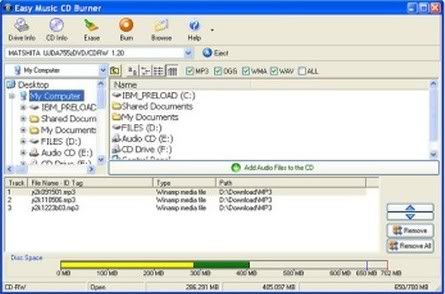
Easy Music CD Burner 3.0.84
Easy Music CD Burner is a simple and easy-to-use Music/Audio CD Burning software for windows. You can burn Music CD directly from MP3 / OGG / WMA / WAV files with just a few clicks; No temporary files are required. It produces music CD with excellent sound quality compared with other software and you can enjoy your music CD on your stereo. It supports majority of modern CD writer drives, so you can get started today.
NextLevel MP3 CD Burner Gold v7.4.0.12
Turn your favorite MP3 files to CD in MP3 format with MP3 CD Burner Gold; it is easy-to-use audio-CD-burning software. The created CD can be played in all CD and DVD players at home or in your car. It allows you to burn audio files with high speed and excellent audio quality.
Features:
# Create high-quality CDs from MP3 and WAV files.
# Easy-to-use interface.
# Add desired MP3 or WAV files before burning.
# Remove selected MP3 or WAV files or clear all audio files before burning.
# Support most popular CD Recorders
# Support “Burn-Proof” CDR-W drives
Size: 7.3MB

CDBurnerXP Pro 4.2.4.1322 (Portable)
CDBurnerXP is an easy to use and free application to burn CDs and DVDs, including Blu-Ray and HD-DVDs. It also includes the feature to burn and create ISOs, as well as a multilanguage interface. You can create data and audio CDs with or without gaps between tracks, burn and create ISO files, create bootable discs. It does however support Burn-Proof technology, multi-session disks, import of ISO images has bin/nrg - ISO converter, simple cover printing and much more. In addition to CD/DVD burning, you can also rip audio CDs, normalize WAV files, encode MP3 files, erase disks. Compatible with Windows 2000/XP/2003 Server/Vista operating systems. Everyone, even companies, can use it for free. It does not include adware or similar malicious components.
Create Data-CDs/DVDs:
? burn any Data on CD-R/CD-RW/DVD R/DVD-R/DVD RW/DVD-RW, including double layer mediums
? burn mp3-CDs to store many audio files on one single disc
? create bootable discs
? verify written Data automatically after burning process
? use either the internal browser to add your files or the intuitive Drop-Box to drag and drop files directly from any Windows Explorer window
? save your compilations for creation of backups
? burn on-the-fly and with buffer-underrun protections
? import previous (ISO 9660) sessions and edit existing file structure on CD/DVD
? quick- and full-erase disc
? copy data discs (possible copy-protection is not bypassed)
? retrieve recorder and disc information
Create Audio-CDs:
? create Audio-CDs from mp3, wav, ogg and wma files
? add single or multiple tracks from existing audio-CDs directly to your new compilation without ripping tracks before (add cda-files)
? play audio-files with integrated audio player
? gapless audio-CDs supported (disc-at-once-mode)
? import M3U or WPL playlists
ISO features:
? burn ISO files to CD
? create your own ISO files
? convert bin- and nrg-files to ISO
? save CDs/DVDs as ISO file to disc
Other features:? simple cover printing feature for data- and audio-discs
? supports most IDE, USB, Firewire and SCSI drives
? integrated option to enable access to drive for restricted users
? multi-language interface
? online update

DOWNLOAD
Source: www.warezvb.org
Source: www.warezvb.org
VSO ConvertXToDVD 3.5.1.135
Tuesday, June 2, 2009

ConvertXtoDVD (formerly DivXtoDVD) is a software to convert and burn your videos to DVD. With ConvertXtoDVD and in a few clicks you can backup your movies to DVD playable on any home DVD player.
ConvertXtoDVD supports most popular format such Xvid, MOV, VOB, Mpeg, Mpeg4, MP4, AVI, WMV, DV and stream formats. It converts your files into a compliant DVD Video set of files and burns it on a DVD media.
The aspect ratio can be automatically selected or forced to a specific format. The program works for NTSC and PAL video formats and creates chapters automatically. Multiple audio tracks are supported. Version 2 uses a completely rewritten interface with subtitles support and a lot of new settings.
FEATURES:
• Video formats supported: avi, divx, xvid, mov, mkv, flv, mpeg-1, mpeg2-, mpeg-4, nsv, dvr-ms, tivo, ts, ifo, vob, asf, wmv, realmedia, rm, rmvb, ogm, existing files from digital camcorders, TV/Sat, capture cards, etc. No external codecs needed like avi codec download
• Create DVD menus with different templates available, possibility to add background video, image or audio, have chapter and audio/subtitle menus
• Conversion advisor wizard, control of the conversion speed vs. quality
• Fast and quality encoder, typically less than 1 hour for converting 1 movie, and supports Multi-Core processors!
• Included burning engine with burn speed control choice of SAO or packet writing methods, supports all DVD formats
• Custom and or automatic chapter creation with markers and preview window
• Advanced file merging possibilities
• Audio formats supported internal and external: AC3, DTS, PCM, OGG, MP3, WMA and more...
• Subtitles files supported internal and external: SRT, .SUB/IDX, .SSA with color and font selection, and supports tags like italic, bold
• Video output for video standard (NTSC, PAL), TV Screen (Widescreen 16:9, Fullscreen 4:3) and DVD Resolution (Full D1, Boradcast D1, Half D1, SIF), or choose automatic for all choices listed above. Also convert video from NTSC to PAL or PAL to NTSC
• Video post processing settings like video resize-pad/cropping and de-interlacing options
• Multilingual support
• Optimized for Windows 2000 / XP / Vista
DOWNLOAD
Source: softmalina.com
Source: softmalina.com
SlySoft CloneCD 5.3.1.4

CloneCD is the perfect tool to make backup copies of your music and data CDs, regardless of copy protection. CloneCD's award-winning user interface allows you to copy almost any CD in just a few mouse clicks. Since the release of 5.0, CloneCD is not only able to copy CDs but also most DVD formats, such as DVD-R, DVD-RW, DVD+R, DVD+RW, DVD+R Dual Layer and DVD-RAM. The movies are copied 1:1 and therefore not modified (compressed). Note that to copy movie DVDs you also require AnyDVD.
CloneCD also works with other formats such as ISO and UDF files and copies CDs/DVDs with the new SafeDisc 3 Copy Protection System. CloneCD allows you to create perfect 1:1 copies of your valuable original compact discs. Should your copy-protected music CD not play in your car audio, the backup created by CloneCD will.
Slysoft combine knowledge and innovation with many years of experience and direct communication with customers to provide constant improvements, therefore making CloneCD the highest quality copying application around.
Product Highlights CloneCD:
• First copying program that uses RAW-Mode
• Creates working 1:1 copies on CD-Rs and CD-RWs
• Amplifies 'Weak Sectors' - works with selected CD writers
• Emulates 'Weak Sectors' - works with each and every CD writer
• Works with CD-ROMs, CD-Rs and CD-RWs
• Writes Audio CDs conforming to Redbook standard
• Tray-Icon controls functional usage of inserted media
• Copies from CD/DVD drives, harddrive or Virtual Drives
• Intuitive user interface, easy to use for novices!
• Rich selection of preset options via default Profiles
• Advanced options for expert users
• Stable, fast and does not require an ASPI driver
• Professional technical support and customer care
• Copies DVD-R, DVD-RW, DVD+R, DVD+RW, DVD+R Dual Layer and DVD-RAM
• Supports DVD split file image formats - this format works with FAT32 partitions and is compatible with VirtualCloneDrive
• Supports ISO and UDF formats created by other applications (e.g., Nero, DVD2One, DVDShrink or CloneDVD)
• Copies SafeDisc 3 protected CDs/DVD
• Emulates SafeDisc 3 weak sectors
DOWNLOAD
Source: softmalina.com
Source: softmalina.com
Blu-Ray to DVD

Perfectly splits and burns a Blu-ray movie to multiple DVDs Blu-ray to DVD II Pro gives you the freedom to enjoy Blu-ray movies on your DVD player, with almost the same quality!Now you can easily copy your Blu-ray movie to DVD or AVCHD with only one click. The built-in SmartExpress HD video codec module and SmartBurn burning engine will ensure an effective and fast burn. If the Blu-ray movie is encrypted, a third party decryption application, like Blu-Ray/HD DVD Copy Helper, is needed. Features: 1.Blu-ray to DVD * With only one click, you can compress a Blu-ray movie to one DVD-5 or DVD-9, or two DVD-5s * Copies a Blu-ray movie to a DVD movie and save it on the harddisk drive * The SmartExpress HD video codec module ensures an effective and fast burn * The SmartBurn burning engine is the most stable and fast one tested by DVD-Cloner * Compresses the harddisk Blu-ray movie to a DVD-R/RW or two DVD-5s * Saves your desired audio track * Burns the movie to more blank discs and you’ll get a better picture and sound effect ( “Blu-ray to two DVD-5” copy mode only) * Copies a Blu-ray movie to a DVD movie and saves it on the harddisk drive * Compresses the harddisk Blu-ray movie to a DVD * Supports for all DVD players and DVD software player * Copies encrypted Blu-ray movies with the help of a third-party Blu-Ray/HD DVD Copy Helper. ( Blu-Ray/HD DVD Copy Helper is not produced by OpenCloner Inc. OpenCloner Inc. will not be responsible for this product.) Click here to learn more. 2.Blu-ray to AVCHD * With only one click, you can compress a Blu-ray movie to one AVCHD DVD-R/RW or DVD-R/RWs, which has a better video and audio effect. *1 * “1:1 copy” can perfectly copy a Blu-ray movie to DVDs without any compress or quality loss. *2 * Copies a Blu-ray movie to a AVCHD movie and save it on the harddisk drive * The SmartExpress HD video codec module ensures an effective and fast burn * SmartBurn burning engine. It is the most stable and fast validated many times by DVD-Cloner * Compresses a harddisk Blu-ray movie to one AVCHD DVD * Saves the audio track and subtitle you prefer * Selects your desired resolution * Burns the movie to more blank discs and you’ll get a better picture and sound effect Copies the harddisk Blu-ray movie to one AVCHD DVD-R/RW or multiple AVCHD DVD-R/RWs * Supports for all the Blu-ray players and Blu-ray software player * Copies encrypted Blu-ray movies with the help of a third-party Blu-Ray/HD DVD Copy Helper. ( Blu-Ray/HD DVD Copy Helper is not produced by OpenCloner Inc. OpenCloner Inc. will not be responsible for this product.) Click here to learn more. 1: AVCHD can’t be played back on DVD players. You need a Blu-ray player, like PS3, Sony BDP-S1 (1.55), Samsung BD-P 1200 and so on, or the software player in PC, like PowerDVD. 2: Since there isn’t any compression under 1:1 copy mode, four to ten blank DVDs are needed.
Size: 6.7 MB
DOWNLOAD
Source: softmalina.com
DOWNLOAD
Source: softmalina.com
Xilisoft DVD Creator 3.0.30.0713

Xilisoft DVD Creator provides a simple, fast way to convert popular video formats such as convert AVI to DVD, WMV, ASF, DivX, Xvid, 3GP, MP4, MPEG to DVD and burn DVD movie which is playable on home DVD player with the perfect quality. Xilisoft DVD Creator allows you to specify NTSC or PAL format, adjust 4:3 or 16:9 video aspect, and either burn DVD movie disc or ISO file. The DVD Creator, i.e. DVD maker, is also DVD menu maker which provides so many brilliant DVD menus for your DVD authoring, supports DVD-R, DVD+R, DVD-RW and DVD+RW. No DVD maker supports so comprehensive video formats like Xilisoft DVD Creator! So easy to use and fast than ever before, just one click to burn DVD movie or convert AVI to DVD, MPEG to DVD! There has been no DVD burner supporting so comprehensive video formats including AVI, MPEG, WMV, DivX, Xvid, VOB, 3GP, MP4, etc., which means that the Internet will become storehouse of your home theater! And compared with other application, Xilisoft DVD Creator has more features attracting your eyes. Super fast converting speed! • Offer multithreading and batch conversion; • Fully support Intel? Pentium D Dual-Core Processor and AMD Athlon? 64 X 2 Dual-Core Processor; • Provide >200% converting speed, so fast beyond your imagination. • Burn DVD movie disc with DVD title Menu, own DVD menu maker; • Support all popular video and audio formats; • Encoders and decoders are built-in. Features : • Convert AVI to DVD, WMV, DV, DivX, Xvid, VOB, 3GP, 3G2, MP4, MPEG to DVD; • Burn AVI to DVD, WMV, DV, DivX, Xvid, VOB, 3GP, 3G2, MP4, MPEG to DVD, DVD maker; • DVD Creator is the easiest, fastest way to burn DVD movie disc with DVD menu maker; • High-Quality and fastest converting engine inside; • Support multiple Bitrate and Frame Rate, you can get best quality video with TV screen; • Allow you to specify NTSC or PAL format, adjust 4:3 or 16:9 video aspect; • Burn DVD movie disc, ISO file, or DVD folder; • DVD Creator as DVD maker provides so many brilliant DVD menus for DVD authoring; • Supported device types include DVD-R, DVD+R, DVD-RW, DVD+RW.
DOWNLOAD
Source: www.vatenas.com
Source: www.vatenas.com
Hiren's Boot CD 9.4

Hiren's Boot CD is a boot CD containing various diagnostic programs such as partitioning agents, system performance benchmarks, disk cloning and imaging tools, data recovery tools, MBR tools, BIOS tools, and many others for fixing various computer problems. It is a Bootable CD; thus, it can be useful even if the primary operating system cannot be booted. Hiren's Boot CD has an extensive list of software. Utilities with similar functionality on the CD are grouped together and seem redundant; however, they present choices through UI differences.
Hiren's BootCD - All in one Dos Bootable CD which has all these utilities.
Partition Tools:
- Partition Magic Pro 8.05 - Best software to partition hard drive
- Acronis Disk Director Suite 9.0.554 - Popular disk management functions in a single suite
- Paragon Partition Manager 7.0.1274 - Universal tool for partitions
- Partition Commander 9.01 - The safe way to partition your hard drive,with undo feature
- Ranish Partition Manager 2.44 - a boot manager and hard disk partitioner.
- The Partition Resizer v1.3.4 - move and resize your partitions in one step and more.
- Smart Fdisk 2.05 - a simple harddisk partition manager
- SPecial Fdisk 2000.03t - SPFDISK a partition tool.
- eXtended Fdisk 0.9.3 - XFDISK allows easy partition creation and edition
- GDisk 1.1.1 - Complete replacement for the DOS FDISK utility and more.
- Super Fdisk 1.0 - Create, delete, format partitions drives without destroying data
Disk Clone Tools:
- ImageCenter 5.6 (Drive Image 2002) - Best software to clone hard drive
- Norton Ghost 11.0.1 - Similar to Drive Image (with usb/scsi support)
- Acronis True Image 8.1.945 - Create an exact disk image for complete system backup and disk cloning.
- Partition Saver 3.50 - A tool to backup/restore partitions.
- COPYR.DMA Build013 - A Tool for making copies of hard disks with bad sectors
Antivirus Tools:
- F-Prot Antivirus 3.16f (1410) - Very good virus scanner (with ntfs support and easy to use menu)
- McAfee Antivirus 4.4.50 (1410) - a virus scanner (with ntfs support and easy to use menu)
Recovery Tools:
- Active Partition Recovery 3.0 - To Recover a Deleted partition.
- Active Uneraser 3.0 - To recover deleted files and folders on FAT and NTFS systems.
- Ontrack Easy Recovery Pro 6.10 - To Recover data that has been deleted/virus attack
- Winternals Disk Commander 1.1 - more than just a standard deleted-file recovery utility
- TestDisk 6.9b - Tool to check and undelete partition.
- Lost & Found 1.06 - a good old data recovery software.
- DiyDataRecovery Diskpatch 2.1.100 - An excellent data recovery software.
- Prosoft Media Tools 5.0 v1.1.2.64 - Another excellent data recovery software with many other options.
- PhotoRec 6.9b - File and pictures recovery Tool.
Testing Tools:
- System Speed Test 4.78 - it tests CPU, harddrive, ect.
- PC-Check 6.0 - Easy to use hardware tests
- Ontrack Data Advisor 5.0 - Powerful diagnostic tool for assessing the condition of your computer
- The Troubleshooter 7.02 - all kind of hardware testing tool
- PC Doctor 2004 - a benchmarking and information tool
- Test Cpu/Video/Disk 5.6 - a tool to test cpu, video, and disk
- Test Hard Disk Drive 1.0 - a tool to test Hard Disk Drive
RAM (Memory) Testing Tools:
- DocMemory 3.1b - RAM Test utility
- GoldMemory 5.07 - RAM Test utility
- Memtest86+ 1.70 - PC Memory Test
Hard Disk Tools:
- Hard Disk Diagnostic Utilities
- Seagate Seatools Desktop Edition 3.02
- Western Digital Data Lifeguard Tools
- Western Digital Diagnostics (DLGDIAG) 5.04f
- Maxtor PowerMax 4.23
- Maxtor amset utility 4.0
- Maxtor(or any Hdd) Low Level Formatter 1.1
- Fujitsu HDD Diagnostic Tool 7.00
- Fujitsu IDE Low Level Format 1.0
- Samsung HDD Utility(HUTIL) 2.04
- Samsung Disk Diagnose (SHDIAG) 1.28
- IBM/Hitachi Drive Fitness Test 4.08
- IBM/Hitachi Feature Tool 2.03
- Gateway GwScan 5.12
- ExcelStor's ESTest 4.20
- MHDD 4.6
- WDClear 1.30
- Toshiba Hard Disk Diagnostic 2.00b
- SeaTools for Dos 1.09
- HDD Regenerator 1.51 - to recover a bad hard drive
- Ontrack Disk Manager 9.57 - Disk Test/Format/Maintenance tool.
- Norton Disk Doctor 2002 - a tool to repair a damaged disk, or to diagnose your hard drive.
- Norton Disk Editor 2002 - a powerful disk editing, manual data recovery tool.
- Hard Disk Sentinel 0.01 - Hard Disk health, performance and temperature monitoring tool.
- Active Kill Disk 4.1 - Securely overwrites and destroys all data on physical drive.
- HDAT2 4.5.3 - main function is testing and repair (regenerates) bad sectors for devices
- SmartUDM 2.00 - Hard Disk Drive S.M.A.R.T. Viewer.
- Victoria 3.33 - a freeware program for low-level HDD diagnostics
- HDD Eraser 1.0 - Secure erase using a special feature built into most newer hard drives
System Information Tools:
- Aida16 2.14 - a system information tool, extracts details of all components of the PC
- PCI and AGP info Tool (1410) - The PCI System information & Exploration tool.
- System Analyser version 5.3s - View extensive information about your hardware
- Navratil Software System Information 0.59.14 - High-end professional system information tool
- Astra 5.33 - Advanced System info Tool and Reporting Assistant
- HwInfo 5.0.5 - a powerful system information utility
- PC-Config 9.33 - Complete hardware detection of your computer
- SysChk 2.46- Find out exactly what is under the hood of your PC
- CPU Identification utility v1.12 - Detailed information on CPU (CHKCPU.EXE)
- CTIA CPU Information - another CPU information tool
MBR (Master Boot Record) Tools:
- MBR Work 1.07b - a utility to perform some common and uncommon MBR functions
- MBR Tool 2.2.100 - backup, verify, restore, edit, refresh, remove, display, re-write...
- DiskMan4 - all in one tool for cmos, bios, bootrecord and more
- BootFix Utility - Run this utility if you get 'Invalid system disk'
- MBR SAVE / RESTORE 2.1 - BootSave and BootRest tools to save / restore MBR
- Boot Partition 2.60 - add Partition in the Windows NT/2000/XP Multi-boot loader
- Partition Table Doctor 3.5 - a tool to repair/modify mbr, bootsector, partition table
- Smart Boot Manager 3.7.1 - a multi boot manager
- Bootmagic 8.0 - This tool is for multi boot operating systems
- MBRWizard 2.0b - Directly update and modify the MBR (Master Boot Record)
BIOS / CMOS Tools:
- CMOS 0.93 - CMOS Save / Restore Tool
- BIOS Cracker 4.8 - BIOS password remover (cmospwd)
- BIOS Cracker 1.4 - BIOS password remover (cmospwc)
- BIOS Utility 1.35.0 - BIOS Informations, password, beep codes and more.
- !BIOS 3.20 - a powerfull utility for bios and cmos
- DISKMAN4 - a powerful all in one utility
- UniFlash 1.40 - bios flash utility
- Kill CMOS - a tiny utility to wipe cmos
- Award DMI Configuration Utility 2.43 - DMI Configuration utility for modifying/viewing the MIDF contents.
MultiMedia Tools:
- Picture Viewer 1.94 - Picture viewer for dos, supports more then 40 filetypes.
- QuickView Pro 2.58 - movie viewer for dos, supports many format including divx.
- MpxPlay 1.55 - a small Music Player for dos
Password Tools:
- Active Password Changer 3.0.420 - To Reset User Password on windows NT/2000/XP/2003 (FAT/NTFS)
- Offline NT/2K/XP Password Changer - utility to reset windows nt/2000/xp administrator/user password.
- Registry Viewer 4.2 - Registry Viewer/Editor for Win9x/Me/NT/2K/XP
- Registry Reanimator v1.02 - check and restore structure of the damaged registry files of NT/2K/XP
- NTPWD - utility to reset windows nt/2000/xp administrator/user password.
- ATAPWD 1.2 - Hard Disk Password Utility
NTFS Ext2FS, Ext3FS (FileSystems) Tools :
- NTFS Dos Pro 5.0 - To access ntfs partitions from Dos
- NTFS 4 Dos 1.9 - To access ntfs partitions from Dos
- Paragon Mount Everything 3.0 - To access NTFS, Ext2FS, Ext3FS partitions from dos
- NTFS Dos 3.02 - To access ntfs partitions from Dos
- EditBINI 1.01 - to Edit boot.ini on NTFS Partition
Dos File Managers:
- Volkov Commander 4.99 - Dos File Manager with LongFileName/ntfs support (Similar to Norton Commander)
- Dos Command Center 5.1 - Classic dos-based file manager.
- File Wizard 1.35 - a file manager - colored files, drag and drop copy, move, delete etc.
- File Maven 3.5 - an advanced Dos file manager with high speed PC-to-PC file transfers via serial or parallel cable
- FastLynx 2.0 - Dos file manager with Pc to Pc file transfer capability
- LapLink 5.0 - the smart way to transfer files and directories between PCs.
- Dos Navigator 6.4.0 - Dos File Manager, Norton Commander clone but has much more features.
- Mini Windows 98 - Can run from Ram Drive, with ntfs support, Added 7-Zip which supports .7z .zip .cab .rar .arj .gzip, .bzip2 .z .tar .cpio .rpm and .deb, Disk Defragmenter, Notepad / RichText Editor, Image Viewer, .avi .mpg .divx .xvid Movie Player, etc...
Other Tools:
- Ghost Walker 2003.793 - utility that changes the security ID (SID) for Windows NT, 2000 and XP
- DosCDroast beta 2 - Dos CD Burning Tools
- Universal TCP/IP Network 6.01 - MSDOS Network Client to connect via TCP/IP to a Microsoft based network. The network can either be a peer-to-peer or a server based network, it contains 85 different network card drivers
Dos Tools:
- USB CD-Rom Driver 1 - Standard usb_cd.sys driver for cd drive
- Universal USB Driver 2 - Panasonic v2.20 ASPI Manager for USB mass storage
- SCSI Support - SCSI Drivers for Dos
- SATA Support - SATA Driver (gcdrom.sys) and JMicron JMB361 (xcdrom.sys) for Dos
- 1394 Firewire Support - 1394 Firewire Drivers for Dos
- Interlnk support at COM1 To access another computer from COM port
- Interlnk support at LPT1 - To access another computer from LPT port
Windows Tools:
- SpaceMonger 1.4 - keeping track of the free space on your computer
- WinDirStat 1.1.2.80 - a disk usage statistics viewer and cleanup tool for Windows.
- Drive Temperature 1.0 - Hard Disk Drive temperature meter
- Disk Speed 1.0 - Hard Disk Drive Speed Testing Tool
- MemTest 1.0 - a Memory Testing Tool
- S&M Stress Test 1.9.0 - cpu/hdd/memory benchmarking and information tool, including temperatures/fan speeds/voltages
- PageDfrg 2.32 - System file Defragmenter For NT/2k/XP
- WhitSoft File Splitter 4.5a - a Small File Split-Join Tool
- Ghost Image Explorer 11.0.1 - to add/remove/extract files from Ghost image file
- DriveImage Explorer 5.0 - to add/remove/extract files from Drive image file
- Drive SnapShot 1.38 - creates an exact Disk Image of your system into a file while windows is running.
- Active Undelete 5.1.010 - a tool to recover deleted files
- Restoration 2.5.14 - a tool to recover deleted files
- GetDataBack for FAT 2.31 - Data recovery software for FAT file systems
- GetDataBack for NTFS 2.31 - Data recovery software for NTFS file systems
- Recuva 1.06.132 - Restore deleted files from Hard Drive, Digital Camera Memory Card, usb mp3 player...
- Unstoppable Copier 3.12 - Allows you to copy files from disks with problems such as bad sectors, scratches or that just give errors when reading data.
- Express Burn 4.05 - CD/DVD Burner Program to create and record CDs/DVDs, also create/burn .iso and .nrg images
- Data Shredder 1.0 - A tool to Erase disk and files (also wipe free space) securely
- Startup Control Panel 2.8 - a tool to edit startup programs
- NT Registry Optimizer 1.1j - Registry Optimization for Windows NT/2000/2003/XP/Vista
- DefragNT 1.9 - This tool presents the user with many options for disk defragmenting
- JkDefrag 3.26 - Free disk defragment and optimize utility for Windows 2000/2003/XP/Vista
- Startup Monitor 1.02 - it notifies you when any program registers itself to run at system startup
- IB Process Manager 1.04 - a little process manager for 9x/2k, shows dll info etc.
- Process Explorer 11.02 - shows you information about which handles and DLLs processes have opened or loaded
- Pocket KillBox 2.0 - can be used to get rid of files that stubbornly refuse to allow you to delete them
- Unlocker 1.8.5 - This tool can delete file/folder when you get this message - Cannot delete file: Access is denied, The file is in use by another program etc.
- HijackThis 2.0b - a general homepage hijackers detector and remover and more
- RootkitRevealer 1.7 - Rootkit Revealer is an advanced patent-pending root kit detection utility.
- Silent Runners Revision 52 - A free script that helps detect spyware, malware and adware in the startup process
- Autoruns 8.73 - Displays All the entries from startup folder, Run, RunOnce, and other Registry keys, Explorer shell extensions,toolbars, browser helper objects, Winlogon notifications, auto-start services, Scheduled Tasks, Winsock, LSA Providers, Remove Drivers and much more which helps to remove nasty spyware/adware and viruses.
- Dial a Fix 0.60.0.24 - Fix errors and problems with COM/ActiveX object errors and missing registry entries, Automatic Updates, SSL, HTTPS, and Cryptography service (signing/verification) issues, Reinstall internet explorer etc. comes with the policy scanner
- CurrPort 1.20 - displays the list of all currently opened TCP and UDP ports on your computer
- Unknown Devices 1.2 (1410) - helps you find what those unknown devices in Device Manager really are
- PCI 32 Sniffer 1.1 (1410) - device information tool (similar to unknown devices)
- NewSID 4.10 - utility that changes the security ID (SID) for Windows NT, 2000 and XP
- Double Driver 1.0 - Driver Backup and Restore tool
- DriverBackup! 1.0.2 - Another handy tool to backup drivers
- CPU-Z 1.41 -It gathers information on some of the main devices of your system
- CWShredder 2.19 - Popular CoolWebSearch Trojan Remover tool
- Winsock 2 Fix for 9x - to fix corrupted Winsock2 information by poorly written Internet programs
- XP TCP/IP Repair 1.0 - Repair your Windows XP Winsock and TCP/IP registry errors
- CCleaner 1.41.544 - Crap Cleaner is a freeware system optimization and privacy tool
- EzPcFix 1.0.0.16 - Helpful tool when trying to remove viruses, spyware, and malware
- Content Advisor Password Remover 1.0 - It Removes Content Advisor Password from Internet Explorer
- WinKeyFinder 1.73 - Allows you to View and Change Xp, Windows 2003 and .NET Product Keys
- Wireless Key View 1.11 - Recovers all wireless network keys (WEP/WPA) stored in your computer by WZC
- Monitor Tester 1.0 - Allows you to test CRT/LCD/TFT screens for dead pixels and diffective screens
- Shell Extensions Manager (ShellExView) 1.18 - An excellent tool to View and Manage all installed Context-menu/Shell extensions
- TweakUI 2.10 - This PowerToy gives you access to system settings that are not exposed in the Windows Xp
- Xp-AntiSpy 3.96.6 - it tweaks some Windows XP functions, and disables some unneeded Windows services quickly
- PC Wizard 2008 1.80 - Powerful system information/benchmark utility designed especially for detection of hardware.
- Spybot - Search & Destroy 1.4 (1410) - Application to scan for spyware, adware, hijackers and other malicious software.
- SpywareBlaster 3.5.1 (1410) - Prevent the installation of spyware and other potentially unwanted software.
- Ad-Aware SE Personal 1.06 (1410) - find and remove spyware, adware, dialers etc. (a must have tool)
DOWNLOAD
Source: www.vatenas.com
DOWNLOAD
Source: www.vatenas.com
DVD MovieFactory® 6 Plus

DVD MovieFactory® 6 Plus - Easy-to-use disc authoring and burning software that lets you do more with your standard or High-Definition digital media. Turn your standard or HD video and photos into DVDs with studio-quality personalized menus. Create HD or standard discs with studio-quality personalized menus. Use the new Edit Room to add polish to your videos, with titles, music and effects. Archive, share and play your music, data, photos and videos on CD, DVD, HD DVD or Blu-ray Disc.
Ulead DVD MovieFactory is the simple and fun way to make great DVD movies and is a whole new world of CD and DVD burning. Create music CDs and burn digital video or VHS movies to disc without storing the video onto your hard drive first. Keep your files safe by backing up all your data to CD or DVD. Transform video from camcorder, VHS tape or TV into polished CDs or DVDs with one click. Built-in video and slideshow editing features and fully customizable motion menus makes it simple to create premium quality DVD movies. The wizard-style workflow makes CD and DVD creation fun and simple.
Create Breathtaking DVDs
Create DVD menus that pop. Choose from over 70 motion menu styles with freely modifiable text, objects or buttons, and add cool menu transitions and filters.
Plug-and-go DVD recording
The simplest, "no-editing" way from tape to DVD. Connect your camcorder, VCR or TV tuner to your PC and burn directly to standard or high-definition playable discs.
The HD Disc Experience
End-to-end HD DVD disc creation lets you capture from HD sources such as HDV or AVCHD camcorders, author HD discs and burn to HD DVD discs in full high-definition. Capture direct-to-disc from your DV or HDV camcorder to Blu-ray Disc, or back up your data.
Music, backup, playback – and more!
Compile hours of Hi-Fi music on DVD, or create music CDs and MP3 discs. Copy, span or shrink any kind of disc and make quick-drop backups of your data and pictures. Play back all your videos and movies with WinDVD.
FEATURES:
PureHD™ - HD DVD and Blu-ray
• PureHD™ Capture - Seamlessly capture from the latest high-definition video camcorders from Sony or Canon.
• PureHD™ Authoring & Output - Produce next-generation HD DVD productions with menus.
• Capture from either HDV or DV video camcorder, and burn directly to Blu-ray Disc to create a video disc that plays on your next-generation player.
Polish your video in the "Edit Room"
- Theme Templates for video
• Select a template from a variety of styles, and watch as DVD MovieFactory create a cool opening sequence for you.
• Easy to customize - use a template as is, perhaps just changing the opening titles or music, or use the timeline editing tools to personalize as much as you like.
- Simple Editing tools
• Storyboard Mode and Timeline Mode gives you the flexibility to view your production the way you like.
• Trim, enhance and polish your video to enhance the viewing experience.
• Add transitions between video clips
• Customize pan & zoom in slideshows
Music and Data Burning
- Data
• Burn data, pictures or documents to CD, or single- and double-layer DVD and Blu-ray Disc.
• CD Extra – add data files to your audio CDs.
• Secure data burning – create password-protected data discs.
• Copy Disc – full-featured disc-copy function for all formats: CD, DVD and Blu-ray Disc.
- Music
• DVD-Audio – create audio DVD with hours of high-quality audio.
• Music DVD-Video - create audiophile-quality audio DVD with MPEG, LPCM or AC-3 format, with menu.
• Click and Hiss Removal – clean up recordings from tape or vinyl.
• Rip Audio CDs – Convert audio CDs to MP3 files, or make your own CD compilations to burn to disc.
• MP3 discs provides many hours of uninterrupted MP3 music on a CD or DVD.
• Audio CDs are a snap to create. Just drag your music in MP3 or WMA format, and it will be turned into an audio CD.
- Extras
• Disc-labeling module lets you print a CD label with your playlist over your choice of graphics.
• Labelflash and LightScribe – with appropriate burners and discs, you can burn a title or text directly on CDs or DVDs.
• Dual-core support - Get enhanced performance from Intel® Duo processors on desktops and laptops.
DVD Copy 5 – simple, easy to use Silver version includes:
• Get video from anywhere
• Shrink dual-layer DVDs on to one single-layer disc
• Burn any video format to disc.
PowerISO 4.4

PowerISO 4.4 | 6 mb
PowerISO is a powerful CD/DVD image file processing tool, which allows you to open, extract, create, edit, burn, compress,encrypt , split and convert ISO files, and mount these files with internal virtual drive. It can process almost all CD-ROM image files including ISO and BIN. PowerISO can be used easily, which support shell integration, context menu, drag and drop, clipboard copy paste. Version 4.4 supports unicode names and improved burning.
PowerISO is a powerful CD/DVD image file processing tool, which allows you to open, extract, create, edit, burn, compress,
DOWNLOAD
Source: www.freshwap.net
Source: www.freshwap.net
Roxio Creator 2009 Ultimate DVD ISO

New Roxio Creator 2009 is the only complete
Keep your precious
Roxio delivers the industry’s best and easiest burning and copying tools for protecting your life stories, digital media and files. Learn More.
Video
Edit movies and burn DVDs like a pro
Capture all the excitement and
Music
Give your life the
Make the most of your digital music with hot
Photo
Turn snapshots into fun keepsakes
Make every picture perfect with Creator’s touch-up tools and effects. Combine today’s photos and yesterday’s memories into fun cards, calendars and other digital stories to share and enjoy with family and friends. Learn More.
Sharing
Share a lifetime of memories
Easily share the stories of your life with relatives and friends both near and far. Relive memories in the comfort of your living room, on DVD, on-the-go, or share with the world on YouTube™ or other popular destinations. The new Roxio Online service is now integrated into Creator 2009, so you can create and share basic photo stories right within the application!
DOWNLOAD:
Part 1
Part 2
Part 3
Part 4
Part 5
Part 6
Part 7
Part 8
Part 9
Part 10
Part 11
Part 12
Part 13
Source: www.freshwap.net
Roxio Toast 9.0.2 Titanium For MAC

Product Description:
Toast Titanium 9.0.2 - CD, DVD, & Blu-ray disc burning solution
Burn
Catalog and burn all your
Listen
Expand your music library by recording streaming audio directly from the Internet. Use Toast 9's new audio fingerprinting technology to identify songs and tag with titles, artists, album and more. Create great sounding mixes for burning to CD or even create music
Watch
Import and create high-def video from TiVo, EyeTV, AVCHD camcorders and burn to Blu-ray and standard DVD discs! Watch your movies and TV shows over WiFi on your iPhone or any net connected Mac or PC.
Share
Create Director's Cuts of your favorite TV shows and movies; fit 9GB of dual-layer DVD video onto a single standard DVD, use time saving batch DVD-Video compression/conversion, and single click copy of CDs.
Mac System Requirements
Minimum System Requirements:
Macintosh computer with a PowerPC™ G4, PowerPC G5, or Intel® processor. PowerPC G5 or Intel processor required for encoding and viewing
CD, DVD, Blu-ray, or HD DVD recordable drive
Mac OS X v10.4.x and Mac OS X v10.5.x
600 MB of free disk space to install
Up to 15 GB of temporary free disk space during usage
Additional space may be required when working with high definition content
QuickTime 7.x
Internet connection required for some functionality
HD DVD and Blu-ray (BDMV) video authoring functionality requires purchase of the HD/BD plug-in. (Currently FREE for a limited time)
Optional:
Apple TV, Video iPod, or iPhone
TiVo® Series2™, Series3™, or TiVo HD DVR
Xbox 360™,
EyeTV video recorder or Turbo.264 video encoder hardware
Blackberry® device, Palm® Treo™, and other mobile devices with support for MPEG-4 or H.264 video
Other portable DivX, MPEG-4, or H.264 compliant video player
Supports all QuickTime and other additional file formats including:
Audio: AAC, AIFF, MP3, WAV, M4A, OGG, FLAC, and Dolby Digital AC-3
Video: AVCHD, AVI, DV, MOV, MPEG-1/2/4, DivX, XviD, VOB, VIDEO_TS folder, iMovie projects, EyeTV recordings and TiVoToGo transfers
Photo: BMP, GIF, PDF, PSD, PNG, TIFF
Images: ISO, BIN/CUE, IMG, DMG,
DVDs created with Toast adhere to the official DVD specifications, and are tested with Hollywood standard certification tools to verify DVD player compatibility.
Toast 9 Titanium v9.0.2
Resolves a number of encoding issues related to high-definition source content and creation of Blu-ray video discs
Resolves situation where high-definition DVDs would not play back on PlayStation 3
Resolves a number of TiVo related audio/video sync issues
DOWNLOAD:
Part 1
Part 2
Part 3
Source: www.freshwap.net
Ashampoo Burning Studio v9.0.3
Sunday, May 31, 2009

Ashampoo Burning Studio 9 is a major update that improves almost every aspect of the program, adding many new features and capabilities in every part of the program. It also introduces a new Movie Editor for editing and combining your videos before burning them to DVD. The Movie Editor has functions for cutting, transitions, fades, subtitles, titles and more, plus a point-and-click DVD menu editor with animated themes for creating great-looking interfaces for your DVD movies.
DOWNLOAD
Source: warezworm.com
SoftFlyers Speed Video Converter 4.4.11


Speed Video Converter is a small video conversion tool. Fast conversion speed and easy user interface are its distinct strongpoints.Speed Video Converter supports various video formats, such as AVI(Divx,xDiv), MPEG-4, mpeg(vcd,svcd,dvd compatible), wmv, asf, Quick Time, VOB, DAT. It supports Batch File Convertsion that can convert more than one files, just needs one click.
DOWNLOAD
Source: www.zebip.com
CD Duplicate Master 1.0.0.831 CD Duplicate Master 1.0.0.831

CD Duplicate Master is a complex application which offers users many interesting CD tools.
It can enables you to extract digital audio tracks from an audio CD into sound files on your hard disk; burn audio CD,
data CD to blank CD disc, and data files to the ISO image file; copy all kinds of CD disc; and erase a rewritable
CD-ROM content. It still can grab audio tracks from a CD and save them to your hard drive in various audio formats, like MP3, WMA, OGG and other, and create custom audio CD from MP3, WAV, OGG and WMA files. It is the best choice to backup CD disc!
Main Functions:
Extract digital audio tracks from an audio CD
Burn audio CD, data CD to blank CD disc
Copy all kinds of CD disc
Erase a rewritable CD-ROM content
Features List:
Copy both audio CD and data CD with best quality.
Grab audio tracks from CD and save them to your hard drive in various digital audio formats, like RAW, OGG, MP3 and WAV music files.
Extract digital audio tracks from an audio CD into sound files on your hard disk.
Write files to CD-R media.
Erase the old data from CD-RW.
Name the files which you want to grab, using information received from the CDDB source.
Change and add the information obtained from the audio sources such as name of artist, album and tracks.
Visually judge the progress of the ripping process.
Easy-to-use and user-friendly interface.
Why choose CD Duplicate Master?
Logs record the operation history.
Easy to use interface is suitable for both professional and newbie.
Continued updating is available for registered users.
Easy to install and uninstall.
100% safe application.
30-day money back guarantee.
Professional and admirable customer service.
Source: www.Zebip.com
DVD Fab Platinum 6.0.1.0

DVDFab Platinum is the most powerful and flexible DVD copying/burning software. With 8 copy modes, you can back up any DVD to DVDR in just a few clicks.
DVDFab Platinum is brand new, is completely rewritten, is based on more than 6 years of DVD copy software development.
Features Highlight
A. DVD to DVD
1. 8 DVD to DVD copy modes available: Full Disc, Main Movie, Split, Customize, Customize Split, Clone, Merge and Write Data.
2. Full Disc: All movies, menus and trailers, is copied to a DVD with just one click.
3. Main Movie: Just copy the movie, with specific audio/subpicture.
4. Split: Copy a DVD-9 onto two DVD-5 discs with 100% quality, and preserve original menus on both discs. Ideal for episodic/season DVD movies, TV series, etc.
5. Customize: Personalize your DVDs! Want to make a DVD with only your favorite titles? How about cutting out those annoying commercials? Or selecting specific audio/subpicture? No problem! You can select just your favorite titles, specify the title playback order, with or without original menus, to create a DVD with only the stuff you want!
6. Customize Split: Copy a DVD-9 onto two DVD-5 discs using “Customize” way. Ideal for episode/season DVD.
7. Clone: Make perfect 1:1 bit-to-bit copy of DVDs:
* Make perfect dual layer DVD copy by using the original layer break position.
* Copy data DVD disc, like PS2 DVD.
8. Merge: Combine several titles of several sources into one DVD:
* Combine two DVD-9 like "The Lord of the Rings" into one DVD-9.
* Merge season DVDs to fewer discs.
* Create your own special features collection disc.
9. Write Data: Burn existing DVD folder or ISO image file to DVD writer, or convert DVD folder to ISO image file.
10. Burn to any blank DVD Disc (DVD+R/RW, DVD-R/RW, DVD+R DL, DVD-R DL).
11. Constantly updated to support latest DVD burners and blank DVD discs.
B. Benefits
1. Remove all DVD copy protections, like CSS, CPPM, RC, RCE, APS, UOPs, ARccOS, RipGuard, FluxDVD, CORE X2, etc.
2. Constantly updated to support latest DVD copy protections.
3. Very fast copying speed, normally it’s about 10 - 20 minutes.
4. Backup scratched/dirty disc:
* Even if some information (IFO) cannot be read, you can still copy Main Movie or Customize.
* Recovery from DVD reading (VOB) error.
5. Support both NTSC and PAL DVD.
6. Preview title like real DVD player.
System Requirements
* Windows Vista/XP/2000/98/ME
* Pentium II 500 MHz
* 256 MB of RAM
* 10 GB of Free Hard Disk Space
* A DVD-R(W) or DVD+R(W) Drive
May15th update to v6010 changelog:
* New: DVDFab 6 is the all-in-one software package for copying Blu-ray/DVD and converting video file.
* New: DVDFab 6 consists of several feature options: “DVD to DVD”, “Blu-ray to Blu-ray”, “DVD to Mobile”, “File to Mobile” and “File Mover”.
* New: DVDFab “DVD to DVD” was previously DVDFab Platinum.
* New: DVDFab “File to Mobile” was previously VideoFab Converter.
* New: Updated user interface.
* New: Updated language files.
DVDFab “DVD to DVD”:
* Fix: A PathPlayer problem that playable content be removed in certain cases.
DOWNLOAD
Source: www.zebip.com
Subscribe to:
Posts (Atom)

